
大家好,我是超哥。今天给大家分享 Qwen-Image-2.1-Turbo 图片 AI 模型的本地部署教程,相较于 Qwen-Image-2.1 原版,Turbo 版将生成步数从 40 步缩减至 8 步,大幅提升了图片生成速度。它集文生图和图像编辑于一体,除了高质量图片生成,还支持多图编辑、涂抹编辑、圈选编辑、Mask 编辑、透明 PNG 生成以及主体提取等功能。接下来我会带大家一步步完成模型的本地部署,并搭建网页操作界面,让我们可以直接在电脑本地使用 Qwen-Image-2.1-Turbo。下面我们开始教程。
提示:官方版就是无审查版,经过测试,可以生成任何图片,完全无审查、无限制!

博主电脑环境
显卡:NVIDIA RTX 4080 SUPER(16GB)
CPU:AMD R9 7900X 12-Core Processor(12核)
内存:64GB DDR5(3600 MHz)
Qwen-Image-2.1-Turbo 模型介绍:https://huggingface.co/Qwen/Qwen-Image-2.1-Turbo
一、安装基础环境
1. 安装python
下载地址:https://www.python.org/downloads/release/python-31210/
直达下载:https://www.python.org/ftp/python/3.12.10/python-3.12.10-amd64.exe
验证python是否安装成功,cmd里执行下面代码:
python --version
2. 安装git
下载地址:https://git-scm.com/install/windows
直达下载:https://github.com/git-for-windows/git/releases/download/v2.56.0.windows.2/Git-2.56.0.2-64-bit.exe
验证git是否安装成功,cmd里执行下面代码:
git --version
二、安装虚拟环境
1. 创建模型目录
在D盘创建目录:ImageAITurbo,创建后路径 D:\ImageAITurbo
2. 创建虚拟空间
cmd进入 D:\ImageAITurbo,执行下面命令,创建虚拟空间:
python -m venv qwen-env
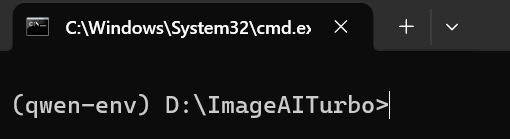
输入下面命令,激活虚拟空间:
qwen-env\Scripts\activate
3. 升级 pip
升级 pip 命令:
python -m pip install --upgrade pip -i https://pypi.org/simple
或者(如果超时不成功):
python -m pip install --upgrade pip
4. 安装 CUDA 版 PyTorch
安装命令:
python -m pip install torch torchvision torchaudio --index-url https://download.pytorch.org/whl/cu128
检测命令:
python -c "import torch; print('CUDA:', torch.cuda.is_available()); print('CUDA版本:', torch.version.cuda); print('GPU:', torch.cuda.get_device_name(0) if torch.cuda.is_available() else '未检测到GPU')"
检测需要出现类似下面文字(一个人一个样):
CUDA: True
CUDA版本: 12.8
GPU: NVIDIA GeForce RTX 4080 SUPER
5. 安装DiffSynth-Studio
下载DiffSynth-Studio命令:
git clone https://github.com/modelscope/DiffSynth-Studio.git
进入DiffSynth-Studio命令:
cd DiffSynth-Studio
安装DiffSynth-Studio命令:
python -m pip install setuptools==81.0.0 -i https://pypi.org/simple
或者(如果超时不成功):
python -m pip install setuptools==81.0.0
然后执行命令:
python -m pip install -e . -i https://pypi.org/simple
或者(如果超时不成功):
python -m pip install -e .
三、下载 Qwen-Image-2.1-Turbo 模型
方法一、网盘下载地址
夸克网盘下载地址:https://pan.quark.cn/s/34d643165bef?pwd=vpJH
迅雷网盘下载地址:https://pan.xunlei.com/s/VP3a7i9wN-3nzqSWikPu7SAaA1?pwd=brnd
方法二、命令下载
Hugging Face 模型下载地址::https://huggingface.co/Qwen/Qwen-Image-2.1-Turbo/tree/main
1. cmd 进入 D:\ImageAITurbo 目录
2. 执行激活虚拟空间命令
qwen-env\Scripts\activate
3. 创建模型目录
执行命令:
mkdir Qwen-Image-2.1-Turbo
4. 安装 Hugging Face
安装命令:
python -m pip install -U huggingface_hub
5. Qwen-Image-2.1-Turbo 模型下载
下载命令:
hf download Qwen/Qwen-Image-2.1-Turbo --local-dir D:\ImageAITurbo\Qwen-Image-2.1-Turbo
四、DiffSynth-Studio 根目录配置启动文件
网盘下载文件
夸克网盘下载地址:https://pan.quark.cn/s/34d643165bef?pwd=vpJH
迅雷网盘下载地址:https://pan.xunlei.com/s/VP3a7i9wN-3nzqSWikPu7SAaA1?pwd=brnd
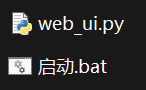
把2个启动文件放到 DiffSynth-Studio 文件夹里:
五. 安装 Windows 版 Triton
安装命令:
python -m pip install -U "triton-windows<3.7" -i https://pypi.org/simple
或者(如果超时不成功):
python -m pip install -U "triton-windows<3.7"
启动程序
双击 D:\ImageAITurbo\DiffSynth-Studio 目录下的 启动.bat ,启动程序
控制面板 URL:http://127.0.0.1:7860/
启动程序代码版(如果网盘无法下载)
1. 启动.bat 代码
@echo off
title Qwen-Image-2.1 XCHAOGE
cd /d "%~dp0"
call ..\qwen-env\Scripts\activate.bat
set "DIFFSYNTH_DISK_MAP_BUFFER_SIZE=1000000000000"
python web_ui.py
pause
2. web_ui.py 代码
import os
# Work around DiffSynth-Studio DiskMap mmap-handle invalidation on Windows.
# Must be set before importing diffsynth.
os.environ["DIFFSYNTH_DISK_MAP_BUFFER_SIZE"] = "1000000000000"
import glob
import json
import random
import threading
import webbrowser
import base64
import io
import traceback
import gc
from PIL import Image
from datetime import datetime
from http.server import BaseHTTPRequestHandler, ThreadingHTTPServer
from urllib.parse import urlparse
import torch
os.environ["DIFFSYNTH_SKIP_DOWNLOAD"] = "True"
from diffsynth.pipelines.qwen_image_21 import QwenImage21Pipeline, ModelConfig
# ========================================
# 基本设置
# ========================================
MODEL_PATH = r"..\Qwen-Image-2.1-Turbo"
OUTPUT_DIR = os.path.join(MODEL_PATH, "output")
# Qwen-Image-2.1-Turbo 推荐采样配置(DiffSynth-Studio 文档)
# Turbo 使用 8 步采样、CFG=1.0,并显式传入专用 sigmas。
TURBO_STEPS = 8
TURBO_CFG_SCALE = 1.0
TURBO_SIGMAS = [
1.0,
0.978453,
0.95418,
0.926626,
0.89508,
0.845148,
0.704534,
0.414568,
]
HOST = "127.0.0.1"
PORT = 7860
os.makedirs(OUTPUT_DIR, exist_ok=True)
# ========================================
# 网页进度状态
# ========================================
last_generated_filename = ""
progress_state = {
"active": False,
"step": 0,
"total": 0,
"status": "等待生成",
"error": ""
}
def web_progress_bar(iterable):
total = len(iterable)
progress_state["active"] = True
progress_state["step"] = 0
progress_state["total"] = total
progress_state["status"] = "正在生成图片……"
progress_state["error"] = ""
for index, item in enumerate(iterable, 1):
progress_state["step"] = index
yield item
# ========================================
# 加载模型
# ========================================
# 使用 CPU 作为权重卸载位置,避免磁盘映射权重在第二次推理时出现
# "Attempted to access the data pointer on an invalid python storage"。
# 64GB 系统内存足以承载 CPU 卸载;计算仍在 CUDA 上进行。
vram_config = {
# 恢复原版 DiffSynth-Studio 的磁盘卸载配置,避免启动阶段因设备配置不兼容而退出
"offload_dtype": "disk",
"offload_device": "disk",
"onload_dtype": "disk",
"onload_device": "disk",
"preparing_dtype": torch.bfloat16,
"preparing_device": "cuda",
"computation_dtype": torch.bfloat16,
"computation_device": "cuda",
}
print()
print("========================================")
print(" Qwen-Image-2.1-Turbo Web UI")
print("========================================")
print()
print("正在加载 Qwen-Image-2.1-Turbo,请稍候...")
print()
pipe = QwenImage21Pipeline.from_pretrained(
torch_dtype=torch.bfloat16,
device="cuda",
model_configs=[
ModelConfig(
path=glob.glob(
os.path.join(
MODEL_PATH,
"transformer",
"diffusion_pytorch_model*.safetensors"
)
),
**vram_config
),
ModelConfig(
path=glob.glob(
os.path.join(
MODEL_PATH,
"text_encoder",
"model*.safetensors"
)
),
**vram_config
),
ModelConfig(
path=glob.glob(
os.path.join(
MODEL_PATH,
"vae",
"diffusion_pytorch_model*.safetensors"
)
),
**vram_config
),
],
processor_config=ModelConfig(
path=os.path.join(MODEL_PATH, "processor")
),
vram_limit=torch.cuda.mem_get_info("cuda")[1] / (1024 ** 3) - 0.5,
)
print()
print("Qwen-Image-2.1-Turbo 加载完成!")
print()
# 如果服务器重启,自动把最近一次 PNG 作为“继续创作”的上一张图片
try:
_existing_outputs = sorted(
[x for x in os.listdir(OUTPUT_DIR) if x.lower().endswith(".png")],
reverse=True
)
if _existing_outputs:
last_generated_filename = _existing_outputs[0]
except Exception:
pass
# ========================================
# HTML 页面
# ========================================
HTML = r"""
Qwen-Image-2.1-Turbo
Qwen-Image-2.1-Turbo
本地 AI 文生图 · 图像编辑 · BY X超哥博客
普通文生图模式。
Qwen-Image-2.1-Turbo 原生支持从普通 RGB 图片提取主体并生成透明 RGBA 图层。
已选择 0 / 10 张
Mask 中白色区域表示需要编辑,黑色区域表示保留。网页会自动将 Mask 调整到原图尺寸。
会保留输入 PNG 的 Alpha 透明度,并将编辑结果重新套回原 Alpha。当前 DiffSynth 接口本身返回普通图像,因此这里采用“编辑后保留原透明层”的方式。
准备中……
生成结果
![]() """
# ========================================
# HTTP Server
# ========================================
class WebHandler(BaseHTTPRequestHandler):
def send_text(self, content, status=200,
content_type="text/html; charset=utf-8"):
data = content.encode("utf-8")
self.send_response(status)
self.send_header(
"Content-Type",
content_type
)
self.send_header(
"Content-Length",
str(len(data))
)
self.end_headers()
self.wfile.write(data)
def do_GET(self):
path = urlparse(self.path).path
if path == "/":
self.send_text(HTML)
return
if path == "/progress":
self.send_text(
json.dumps(
progress_state,
ensure_ascii=False
),
200,
"application/json; charset=utf-8"
)
return
if path == "/history":
files = []
try:
files = sorted(
[x for x in os.listdir(OUTPUT_DIR) if x.lower().endswith(".png")],
reverse=True
)[:24]
except Exception:
files = []
self.send_text(
json.dumps({"items": files}, ensure_ascii=False),
200,
"application/json; charset=utf-8"
)
return
if path.startswith("/output/"):
filename = os.path.basename(path)
filepath = os.path.join(
OUTPUT_DIR,
filename
)
if not os.path.isfile(filepath):
self.send_response(404)
self.end_headers()
return
with open(filepath, "rb") as f:
data = f.read()
self.send_response(200)
self.send_header(
"Content-Type",
"image/png"
)
self.send_header(
"Content-Length",
str(len(data))
)
self.end_headers()
self.wfile.write(data)
return
self.send_response(404)
self.end_headers()
def do_POST(self):
global last_generated_filename
path = urlparse(self.path).path
if path == "/open_folder":
try:
length = int(self.headers.get("Content-Length", 0))
body = self.rfile.read(length)
data = json.loads(body.decode("utf-8"))
filename = os.path.basename(
str(data.get("filename", ""))
)
if not filename:
raise ValueError("图片文件名不能为空")
filepath = os.path.join(
OUTPUT_DIR,
filename
)
if not os.path.isfile(filepath):
raise FileNotFoundError("图片文件不存在")
os.startfile(os.path.dirname(filepath))
self.send_text(
json.dumps(
{"success": True},
ensure_ascii=False
),
200,
"application/json; charset=utf-8"
)
except Exception as e:
self.send_text(
json.dumps(
{
"success": False,
"error": str(e)
},
ensure_ascii=False
),
500,
"application/json; charset=utf-8"
)
return
if path != "/generate":
self.send_response(404)
self.end_headers()
return
try:
length = int(self.headers.get("Content-Length", 0))
body = self.rfile.read(length)
data = json.loads(body.decode("utf-8"))
# 每次新的生成请求到达后,立即重置服务器端进度状态。
# 这样第二次、第三次生成时,前端轮询不会先显示上一张的 100%。
progress_state["active"] = True
progress_state["step"] = 0
progress_state["total"] = TURBO_STEPS
progress_state["status"] = "正在准备模型……"
progress_state["error"] = ""
prompt = str(data.get("prompt", "")).strip()
negative_prompt = str(data.get("negativePrompt", "")).strip()
cfg_scale = TURBO_CFG_SCALE
tiled_vae = bool(data.get("tiledVae", False))
width = int(data.get("width", 1024))
height = int(data.get("height", 1024))
steps = TURBO_STEPS
seed = int(data.get("seed", -1))
mode = str(data.get("mode", "text"))
edit_type = str(data.get("editType", "multi"))
task_type = str(data.get("taskType", "normal"))
image_data = data.get("images", [])
continue_from_last = bool(data.get("continueFromLast", False))
output_transparent = bool(data.get("outputTransparent", False))
if not isinstance(image_data, list): image_data = []
if not prompt: raise ValueError("提示词不能为空")
if mode == "text" and task_type == "extract" and len(image_data) != 1: raise ValueError("抠图模式需要 1 张原图")
if mode == "text" and task_type == "fidelity" and not 1 <= len(image_data) <= 10: raise ValueError("高保真模式需要 1~10 张参考图片")
if mode == "edit" and edit_type == "multi" and not 1 <= len(image_data) <= 10: raise ValueError("多图编辑需要 1~10 张参考图片")
if mode == "edit" and edit_type in ("paint", "mask") and len(image_data) != 2: raise ValueError("局部编辑需要原图和 Mask 两张图片")
if mode == "edit" and edit_type == "circle" and len(image_data) != 1: raise ValueError("圈选编辑需要 1 张标注图片")
if mode == "edit" and edit_type == "alpha" and len(image_data) != 1: raise ValueError("透明图编辑需要 1 张 RGBA 图片")
edit_images = []
for item in image_data:
if not isinstance(item, str) or "," not in item: raise ValueError("参考图片数据无效")
encoded = item.split(",", 1)[1]
try:
image_bytes = base64.b64decode(encoded)
image = Image.open(io.BytesIO(image_bytes))
image.load()
edit_images.append(image.convert("RGBA"))
except Exception as e:
raise ValueError("参考图片无法读取") from e
if mode == "text" and task_type == "continue":
if not last_generated_filename or not os.path.isfile(os.path.join(OUTPUT_DIR, last_generated_filename)):
raise ValueError("没有可继续创作的上一张图片")
previous = Image.open(os.path.join(OUTPUT_DIR, last_generated_filename)).convert("RGBA")
edit_images = [previous]
if mode == "edit" and edit_type == "mask":
if edit_images[0].size != edit_images[1].size: edit_images[1] = edit_images[1].resize(edit_images[0].size, Image.Resampling.NEAREST)
mask_gray = edit_images[1].convert("L")
mask_gray = mask_gray.point(lambda p: 255 if p >= 128 else 0)
edit_images[1] = Image.merge("RGBA", (mask_gray, mask_gray, mask_gray, Image.new("L", mask_gray.size, 255)))
if mode == "edit" and edit_type in ("paint", "mask") and output_transparent:
transparent_alpha = edit_images[1].getchannel("R")
else:
transparent_alpha = None
original_alpha = edit_images[0].getchannel("A") if mode == "edit" and edit_type == "alpha" else None
if seed < 0: seed = random.randint(0, 2147483647)
width = max(256, round(width / 32) * 32)
height = max(256, round(height / 32) * 32)
print()
print("========================================")
print("开始生成图片")
print(f"提示词:{prompt}")
print(f"尺寸:{width} × {height}")
print(f"Steps:{steps}")
print(f"Seed:{seed}")
print(f"模式:{'图像编辑' if mode == 'edit' else '文生图'}")
if mode == "edit": print(f"编辑方式:{edit_type}")
print(f"参考图片:{len(edit_images)} 张")
print("========================================")
final_prompt = prompt
if mode == "text":
task_prefix = {
"transparent": "这是一个需要原生 Alpha 通道的透明 PNG 素材。请直接生成 RGBA 图像,背景必须是真正透明,不要生成棋盘格、白色背景或纯色背景。",
"extract": "请从输入照片中提取指定主体,生成真正带 Alpha 通道的 RGBA 透明图层。删除背景,不要用白色或棋盘格代替透明。",
"panorama": "请以宽幅全景构图生成,保证左右空间连续、透视自然、细节完整。",
"infographic": "请按照信息图/海报设计进行构图,重视信息层级、排版、图形和中文文字清晰度。",
"storyboard": "请按照故事板/连续分镜方式组织画面,保持角色、服装和视觉风格连续。",
"fidelity": "请高度保持参考图中人物或产品的身份特征、外观、材质和关键细节。",
"continue": "请基于上一张图片继续创作,只按照下面的新要求修改,尽可能保持未要求修改的内容一致。"
}
if task_type in task_prefix:
final_prompt = task_prefix[task_type] + "\n" + prompt
if mode == "edit":
image = pipe(prompt=final_prompt, negative_prompt=negative_prompt, cfg_scale=cfg_scale, edit_image=edit_images, width=width, height=height, seed=seed, num_inference_steps=TURBO_STEPS, sigmas=TURBO_SIGMAS, tiled=tiled_vae, progress_bar_cmd=web_progress_bar)
elif task_type in ("extract", "fidelity", "continue"):
image = pipe(prompt=final_prompt, negative_prompt=negative_prompt, cfg_scale=cfg_scale, edit_image=edit_images, width=width, height=height, seed=seed, num_inference_steps=TURBO_STEPS, sigmas=TURBO_SIGMAS, tiled=tiled_vae, progress_bar_cmd=web_progress_bar)
else:
image = pipe(prompt=final_prompt, negative_prompt=negative_prompt, cfg_scale=cfg_scale, width=width, height=height, seed=seed, num_inference_steps=TURBO_STEPS, sigmas=TURBO_SIGMAS, tiled=tiled_vae, progress_bar_cmd=web_progress_bar)
image = image.convert("RGBA")
if mode == "edit" and edit_type == "mask" and transparent_alpha is not None:
alpha = transparent_alpha.resize(image.size, Image.Resampling.NEAREST)
image.putalpha(alpha)
filename = datetime.now().strftime("%Y%m%d_%H%M%S_%f") + ".png"
filepath = os.path.join(OUTPUT_DIR, filename)
image.save(filepath, "PNG")
# 清理本次输出对象及暂存显存,保留 pipe 以便连续生成多张图片。
del image
if torch.cuda.is_available():
torch.cuda.empty_cache()
print(f"生成完成:{filepath}")
last_generated_filename = filename
progress_state["active"] = False
progress_state["step"] = progress_state["total"]
progress_state["status"] = "生成完成"
progress_state["error"] = ""
note = "生成完成!"
if task_type == "transparent": note = "生成完成:已按原生 RGBA Alpha 通道保存透明 PNG。"
if task_type == "extract": note = "生成完成:已从原图提取主体并保存为透明 RGBA PNG。"
if task_type == "continue": note = "生成完成:已基于上一张图片继续创作。"
if mode == "edit" and edit_type == "alpha": note = "生成完成:已使用透明 PNG 作为原生编辑输入,并保留 RGBA 输出。"
if transparent_alpha is not None: note = "生成完成,已按 Mask 输出透明 PNG。"
result = {"success":True,"image":"/output/" + filename,"width":width,"height":height,"steps":steps,"seed":seed,"note":note}
self.send_text(
json.dumps(
result,
ensure_ascii=False
),
200,
"application/json; charset=utf-8"
)
except Exception as e:
progress_state["active"] = False
progress_state["status"] = "生成失败"
progress_state["error"] = str(e)
print()
print("生成失败:")
print(e)
traceback.print_exc()
gc.collect()
if torch.cuda.is_available():
torch.cuda.empty_cache()
result = {
"success": False,
"error": str(e)
}
self.send_text(
json.dumps(
result,
ensure_ascii=False
),
500,
"application/json; charset=utf-8"
)
def log_message(self, format, *args):
return
# ========================================
# 启动服务器
# ========================================
def open_browser():
webbrowser.open(
f"http://{HOST}:{PORT}"
)
server = ThreadingHTTPServer(
(HOST, PORT),
WebHandler
)
print()
print("========================================")
print("Web UI 已启动")
print()
print(f"http://{HOST}:{PORT}")
print("========================================")
print()
print("按 Ctrl+C 可以停止服务器")
print()
threading.Timer(
1.5,
open_browser
).start()
try:
server.serve_forever()
except KeyboardInterrupt:
print()
print("正在关闭服务器……")
server.shutdown()
"""
# ========================================
# HTTP Server
# ========================================
class WebHandler(BaseHTTPRequestHandler):
def send_text(self, content, status=200,
content_type="text/html; charset=utf-8"):
data = content.encode("utf-8")
self.send_response(status)
self.send_header(
"Content-Type",
content_type
)
self.send_header(
"Content-Length",
str(len(data))
)
self.end_headers()
self.wfile.write(data)
def do_GET(self):
path = urlparse(self.path).path
if path == "/":
self.send_text(HTML)
return
if path == "/progress":
self.send_text(
json.dumps(
progress_state,
ensure_ascii=False
),
200,
"application/json; charset=utf-8"
)
return
if path == "/history":
files = []
try:
files = sorted(
[x for x in os.listdir(OUTPUT_DIR) if x.lower().endswith(".png")],
reverse=True
)[:24]
except Exception:
files = []
self.send_text(
json.dumps({"items": files}, ensure_ascii=False),
200,
"application/json; charset=utf-8"
)
return
if path.startswith("/output/"):
filename = os.path.basename(path)
filepath = os.path.join(
OUTPUT_DIR,
filename
)
if not os.path.isfile(filepath):
self.send_response(404)
self.end_headers()
return
with open(filepath, "rb") as f:
data = f.read()
self.send_response(200)
self.send_header(
"Content-Type",
"image/png"
)
self.send_header(
"Content-Length",
str(len(data))
)
self.end_headers()
self.wfile.write(data)
return
self.send_response(404)
self.end_headers()
def do_POST(self):
global last_generated_filename
path = urlparse(self.path).path
if path == "/open_folder":
try:
length = int(self.headers.get("Content-Length", 0))
body = self.rfile.read(length)
data = json.loads(body.decode("utf-8"))
filename = os.path.basename(
str(data.get("filename", ""))
)
if not filename:
raise ValueError("图片文件名不能为空")
filepath = os.path.join(
OUTPUT_DIR,
filename
)
if not os.path.isfile(filepath):
raise FileNotFoundError("图片文件不存在")
os.startfile(os.path.dirname(filepath))
self.send_text(
json.dumps(
{"success": True},
ensure_ascii=False
),
200,
"application/json; charset=utf-8"
)
except Exception as e:
self.send_text(
json.dumps(
{
"success": False,
"error": str(e)
},
ensure_ascii=False
),
500,
"application/json; charset=utf-8"
)
return
if path != "/generate":
self.send_response(404)
self.end_headers()
return
try:
length = int(self.headers.get("Content-Length", 0))
body = self.rfile.read(length)
data = json.loads(body.decode("utf-8"))
# 每次新的生成请求到达后,立即重置服务器端进度状态。
# 这样第二次、第三次生成时,前端轮询不会先显示上一张的 100%。
progress_state["active"] = True
progress_state["step"] = 0
progress_state["total"] = TURBO_STEPS
progress_state["status"] = "正在准备模型……"
progress_state["error"] = ""
prompt = str(data.get("prompt", "")).strip()
negative_prompt = str(data.get("negativePrompt", "")).strip()
cfg_scale = TURBO_CFG_SCALE
tiled_vae = bool(data.get("tiledVae", False))
width = int(data.get("width", 1024))
height = int(data.get("height", 1024))
steps = TURBO_STEPS
seed = int(data.get("seed", -1))
mode = str(data.get("mode", "text"))
edit_type = str(data.get("editType", "multi"))
task_type = str(data.get("taskType", "normal"))
image_data = data.get("images", [])
continue_from_last = bool(data.get("continueFromLast", False))
output_transparent = bool(data.get("outputTransparent", False))
if not isinstance(image_data, list): image_data = []
if not prompt: raise ValueError("提示词不能为空")
if mode == "text" and task_type == "extract" and len(image_data) != 1: raise ValueError("抠图模式需要 1 张原图")
if mode == "text" and task_type == "fidelity" and not 1 <= len(image_data) <= 10: raise ValueError("高保真模式需要 1~10 张参考图片")
if mode == "edit" and edit_type == "multi" and not 1 <= len(image_data) <= 10: raise ValueError("多图编辑需要 1~10 张参考图片")
if mode == "edit" and edit_type in ("paint", "mask") and len(image_data) != 2: raise ValueError("局部编辑需要原图和 Mask 两张图片")
if mode == "edit" and edit_type == "circle" and len(image_data) != 1: raise ValueError("圈选编辑需要 1 张标注图片")
if mode == "edit" and edit_type == "alpha" and len(image_data) != 1: raise ValueError("透明图编辑需要 1 张 RGBA 图片")
edit_images = []
for item in image_data:
if not isinstance(item, str) or "," not in item: raise ValueError("参考图片数据无效")
encoded = item.split(",", 1)[1]
try:
image_bytes = base64.b64decode(encoded)
image = Image.open(io.BytesIO(image_bytes))
image.load()
edit_images.append(image.convert("RGBA"))
except Exception as e:
raise ValueError("参考图片无法读取") from e
if mode == "text" and task_type == "continue":
if not last_generated_filename or not os.path.isfile(os.path.join(OUTPUT_DIR, last_generated_filename)):
raise ValueError("没有可继续创作的上一张图片")
previous = Image.open(os.path.join(OUTPUT_DIR, last_generated_filename)).convert("RGBA")
edit_images = [previous]
if mode == "edit" and edit_type == "mask":
if edit_images[0].size != edit_images[1].size: edit_images[1] = edit_images[1].resize(edit_images[0].size, Image.Resampling.NEAREST)
mask_gray = edit_images[1].convert("L")
mask_gray = mask_gray.point(lambda p: 255 if p >= 128 else 0)
edit_images[1] = Image.merge("RGBA", (mask_gray, mask_gray, mask_gray, Image.new("L", mask_gray.size, 255)))
if mode == "edit" and edit_type in ("paint", "mask") and output_transparent:
transparent_alpha = edit_images[1].getchannel("R")
else:
transparent_alpha = None
original_alpha = edit_images[0].getchannel("A") if mode == "edit" and edit_type == "alpha" else None
if seed < 0: seed = random.randint(0, 2147483647)
width = max(256, round(width / 32) * 32)
height = max(256, round(height / 32) * 32)
print()
print("========================================")
print("开始生成图片")
print(f"提示词:{prompt}")
print(f"尺寸:{width} × {height}")
print(f"Steps:{steps}")
print(f"Seed:{seed}")
print(f"模式:{'图像编辑' if mode == 'edit' else '文生图'}")
if mode == "edit": print(f"编辑方式:{edit_type}")
print(f"参考图片:{len(edit_images)} 张")
print("========================================")
final_prompt = prompt
if mode == "text":
task_prefix = {
"transparent": "这是一个需要原生 Alpha 通道的透明 PNG 素材。请直接生成 RGBA 图像,背景必须是真正透明,不要生成棋盘格、白色背景或纯色背景。",
"extract": "请从输入照片中提取指定主体,生成真正带 Alpha 通道的 RGBA 透明图层。删除背景,不要用白色或棋盘格代替透明。",
"panorama": "请以宽幅全景构图生成,保证左右空间连续、透视自然、细节完整。",
"infographic": "请按照信息图/海报设计进行构图,重视信息层级、排版、图形和中文文字清晰度。",
"storyboard": "请按照故事板/连续分镜方式组织画面,保持角色、服装和视觉风格连续。",
"fidelity": "请高度保持参考图中人物或产品的身份特征、外观、材质和关键细节。",
"continue": "请基于上一张图片继续创作,只按照下面的新要求修改,尽可能保持未要求修改的内容一致。"
}
if task_type in task_prefix:
final_prompt = task_prefix[task_type] + "\n" + prompt
if mode == "edit":
image = pipe(prompt=final_prompt, negative_prompt=negative_prompt, cfg_scale=cfg_scale, edit_image=edit_images, width=width, height=height, seed=seed, num_inference_steps=TURBO_STEPS, sigmas=TURBO_SIGMAS, tiled=tiled_vae, progress_bar_cmd=web_progress_bar)
elif task_type in ("extract", "fidelity", "continue"):
image = pipe(prompt=final_prompt, negative_prompt=negative_prompt, cfg_scale=cfg_scale, edit_image=edit_images, width=width, height=height, seed=seed, num_inference_steps=TURBO_STEPS, sigmas=TURBO_SIGMAS, tiled=tiled_vae, progress_bar_cmd=web_progress_bar)
else:
image = pipe(prompt=final_prompt, negative_prompt=negative_prompt, cfg_scale=cfg_scale, width=width, height=height, seed=seed, num_inference_steps=TURBO_STEPS, sigmas=TURBO_SIGMAS, tiled=tiled_vae, progress_bar_cmd=web_progress_bar)
image = image.convert("RGBA")
if mode == "edit" and edit_type == "mask" and transparent_alpha is not None:
alpha = transparent_alpha.resize(image.size, Image.Resampling.NEAREST)
image.putalpha(alpha)
filename = datetime.now().strftime("%Y%m%d_%H%M%S_%f") + ".png"
filepath = os.path.join(OUTPUT_DIR, filename)
image.save(filepath, "PNG")
# 清理本次输出对象及暂存显存,保留 pipe 以便连续生成多张图片。
del image
if torch.cuda.is_available():
torch.cuda.empty_cache()
print(f"生成完成:{filepath}")
last_generated_filename = filename
progress_state["active"] = False
progress_state["step"] = progress_state["total"]
progress_state["status"] = "生成完成"
progress_state["error"] = ""
note = "生成完成!"
if task_type == "transparent": note = "生成完成:已按原生 RGBA Alpha 通道保存透明 PNG。"
if task_type == "extract": note = "生成完成:已从原图提取主体并保存为透明 RGBA PNG。"
if task_type == "continue": note = "生成完成:已基于上一张图片继续创作。"
if mode == "edit" and edit_type == "alpha": note = "生成完成:已使用透明 PNG 作为原生编辑输入,并保留 RGBA 输出。"
if transparent_alpha is not None: note = "生成完成,已按 Mask 输出透明 PNG。"
result = {"success":True,"image":"/output/" + filename,"width":width,"height":height,"steps":steps,"seed":seed,"note":note}
self.send_text(
json.dumps(
result,
ensure_ascii=False
),
200,
"application/json; charset=utf-8"
)
except Exception as e:
progress_state["active"] = False
progress_state["status"] = "生成失败"
progress_state["error"] = str(e)
print()
print("生成失败:")
print(e)
traceback.print_exc()
gc.collect()
if torch.cuda.is_available():
torch.cuda.empty_cache()
result = {
"success": False,
"error": str(e)
}
self.send_text(
json.dumps(
result,
ensure_ascii=False
),
500,
"application/json; charset=utf-8"
)
def log_message(self, format, *args):
return
# ========================================
# 启动服务器
# ========================================
def open_browser():
webbrowser.open(
f"http://{HOST}:{PORT}"
)
server = ThreadingHTTPServer(
(HOST, PORT),
WebHandler
)
print()
print("========================================")
print("Web UI 已启动")
print()
print(f"http://{HOST}:{PORT}")
print("========================================")
print()
print("按 Ctrl+C 可以停止服务器")
print()
threading.Timer(
1.5,
open_browser
).start()
try:
server.serve_forever()
except KeyboardInterrupt:
print()
print("正在关闭服务器……")
server.shutdown()