
大家好,我是超哥。今天给大家分享 Qwen-Image-2.1-Turbo 无审查版图片 AI 模型的本地部署教程。相较于原版,这个版本提供了最小仅 3.34GB 的量化模型,让普通电脑也能部署运行。它不仅支持文生图和图像编辑,还大幅降低了模型对提示词的拒绝率,让我们可以更自由地发挥创意。接下来,我会带大家一步步完成模型的本地部署,让我们可以直接在自己电脑上生成和编辑图片。下面我们开始今天的教程!
博主电脑环境
显卡:NVIDIA RTX 4080 SUPER(16GB)
CPU:AMD R9 7900X 12-Core Processor(12核)
内存:64GB DDR5(3600 MHz)
一、安装基础环境
1. 安装python
下载地址:https://www.python.org/downloads/release/python-31210/
直达下载:https://www.python.org/ftp/python/3.12.10/python-3.12.10-amd64.exe
验证python是否安装成功,cmd里执行下面代码:
python --version
2. 安装git
下载地址:https://git-scm.com/install/windows
直达下载:https://github.com/git-for-windows/git/releases/download/v2.56.0.windows.2/Git-2.56.0.2-64-bit.exe
验证git是否安装成功,cmd里执行下面代码:
git --version
二、大模型下载
创建模型目录
在D盘创建目录:ImageAITurboU,创建后路径 D:\ImageAITurboU
在 D:\ImageAITurboU 里创建文件夹:models ,把下载到的所有模型文件放到 models 文件夹里
方法1. 网盘下载
夸克网盘 下载地址:https://pan.quark.cn/s/29aa048940d5?pwd=MDEb
迅雷网盘 下载地址:https://pan.xunlei.com/s/VP3jgNWpVW2xj7Yob3yCsD_BA1?pwd=hgvr
方法2. Hugging Face下载
主模型下载地址:https://huggingface.co/AtomicChat/Qwen-Image-2.1-Turbo-GGUF/tree/main
编码器下载地址:https://huggingface.co/AtomicChat/Qwen-Image-2.1-Turbo-Uncensored-GGUF/tree/main
Vae下载地址:https://huggingface.co/Comfy-Org/Qwen-Image-2.1/tree/main/vae
电脑配置模型选择推荐(建议最低 8GB 显存,内存大的可以往下再提一格):
| 模型版本 | 文件大小 | 适用显存 | 推荐说明 |
|---|---|---|---|
| Qwen-Image-2.1-Turbo-AD-Q2_K | 2.55–3.34 GB | 8GB 及以上 | 极限量化,低显存参考 |
| Qwen-Image-2.1-Turbo-AD-Q3_K | 3.6–4.18 GB | 8GB 及以上 | 低显存折中 |
| Qwen-Image-2.1-Turbo-AD-Q4_K | 4.2–5.29 GB | 8–12GB 及以上 | 4-bit 均衡选择 |
| Qwen-Image-2.1-Turbo-AD-Q5_K | 5.4–6.28 GB | 12GB 及以上 | 画质与占用均衡 |
| Qwen-Image-2.1-Turbo-AD-Q6_K | 6.71–7.49 GB | 12–16GB 及以上 | 较高精度量化 |
| Qwen-Image-2.1-Turbo-Q8_0 | 7.59–8.71 GB | 16GB 及以上 | 8-bit 高精度量化 |
| Qwen-Image-2.1-Turbo-BF16 | 14.2–16.4 GB | 24GB 及以上 | 高精度权重 |
| mmproj-Qwen-Image-2.1-Turbo | 1.16 GB | 额外预留显存 | 多模态视觉投影模块,用于图像输入与编辑 |
三、stable-diffusion.cpp 下载
创建 stable-diffusion 文件夹
在 D:\ImageAITurboU 里创建文件夹:stable-diffusion ,把下载到的项目文件解压放到 stable-diffusion 文件夹里
方法1. 网盘下载
夸克网盘 下载地址:https://pan.quark.cn/s/29aa048940d5?pwd=MDEb
迅雷网盘 下载地址:https://pan.xunlei.com/s/VP3jgNWpVW2xj7Yob3yCsD_BA1?pwd=hgvr
方法2. Github下载
Github 下载地址:https://github.com/leejet/stable-diffusion.cpp/releases
四、安装虚拟环境
1. 创建虚拟空间
cmd进入 D:\ImageAITurboU,执行下面命令,创建虚拟空间:
python -m venv venv-webui
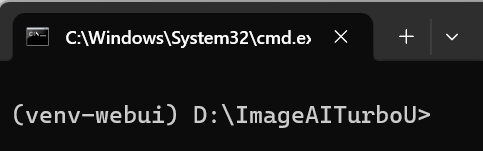
输入下面命令,激活虚拟空间:
venv-webui\Scripts\activate
2. 升级 pip
升级 pip 命令:
python -m pip install --upgrade pip
如果上面命令超时,也可以执行:
python -m pip install --upgrade pip -i https://pypi.org/simple
3. 安装 Gradio
安装命令:
python -m pip install gradio
检测命令:
python -c "import gradio; print('Gradio版本:', gradio.__version__)"
显示版本号
五、配置启动文件
启动文件存放位置 D:\ImageAITurboU
方法1. 网盘下载
夸克网盘 下载地址:https://pan.quark.cn/s/29aa048940d5?pwd=MDEb
迅雷网盘 下载地址:https://pan.xunlei.com/s/VP3jgNWpVW2xj7Yob3yCsD_BA1?pwd=hgvr
方法2. 手动创建
1. 创建 START-WEBUI.bat
@echo off
cd /d "%~dp0"
if not exist "venv-webui\Scripts\python.exe" (
  echo [ERROR] Missing venv-webui\Scripts\python.exe
  pause
  exit /b 1
)
"venv-webui\Scripts\python.exe" app.py
if errorlevel 1 pause
2. 创建 app.py
import subprocess, time
from pathlib import Path
import gradio as gr

ROOT = Path(__file__).resolve().parent
MODELS = ROOT / "models"
CLI = ROOT / "stable-diffusion" / "sd-cli.exe"
OUT = ROOT / "output"
OUT.mkdir(exist_ok=True)

def generate(mode, init_image, prompt, negative, size_mode, aspect_ratio, custom_width, custom_height, steps, cfg, offload):
    prompt = (prompt or "").strip()
    if not prompt:
        raise gr.Error("请先输入提示词。")
    if mode == "图片编辑" and not init_image:
        raise gr.Error("图片编辑模式请先上传一张原图。")

    # Use the editable width/height controls as the final output dimensions.
    try:
        width, height = int(custom_width), int(custom_height)
    except (TypeError, ValueError):
        raise gr.Error("请设置有效的图片宽度和高度。")

    if width < 256 or height < 256 or width > 4096 or height > 4096:
        raise gr.Error("生成尺寸需在 256–4096 像素范围内。")

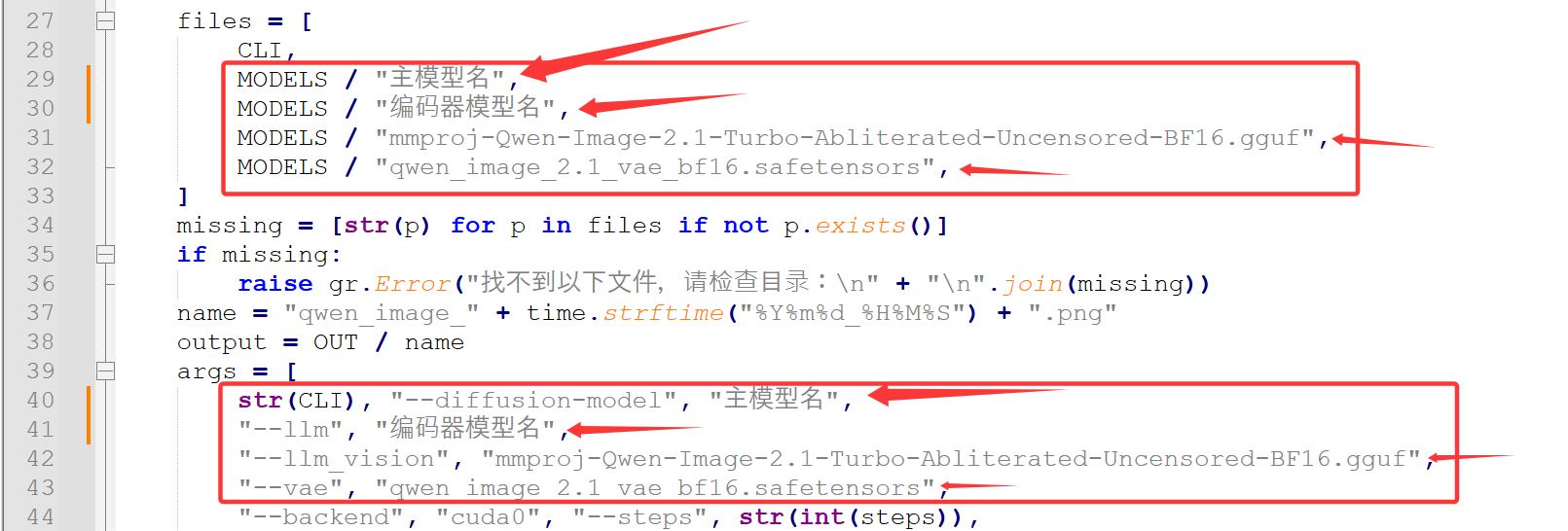
    files = [
        CLI,
        MODELS / "Qwen-Image-2.1-Turbo-BF16.gguf",
        MODELS / "Qwen-Image-2.1-Turbo-Abliterated-Uncensored-BF16.gguf",
        MODELS / "mmproj-Qwen-Image-2.1-Turbo-Abliterated-Uncensored-BF16.gguf",
        MODELS / "qwen_image_2.1_vae_bf16.safetensors",
    ]
    missing = [str(p) for p in files if not p.exists()]
    if missing:
        raise gr.Error("找不到以下文件,请检查目录:\n" + "\n".join(missing))
    name = "qwen_image_" + time.strftime("%Y%m%d_%H%M%S") + ".png"
    output = OUT / name
    args = [
        str(CLI), "--diffusion-model", "Qwen-Image-2.1-Turbo-BF16.gguf",
        "--llm", "Qwen-Image-2.1-Turbo-Abliterated-Uncensored-BF16.gguf",
        "--llm_vision", "mmproj-Qwen-Image-2.1-Turbo-Abliterated-Uncensored-BF16.gguf",
        "--vae", "qwen_image_2.1_vae_bf16.safetensors",
        "--backend", "cuda0", "--steps", str(int(steps)),
        "--cfg-scale", str(float(cfg)), "--width", str(int(width)),
        "--height", str(int(height)), "--prompt", prompt,
        "--output", str(output),
    ]
    if negative and negative.strip():
        args += ["--negative-prompt", negative.strip()]
    if mode == "图片编辑":
        args += ["-r", str(init_image)]
    if offload:
        args.append("--offload-to-cpu")
    try:
        p = subprocess.run(args, cwd=str(MODELS), capture_output=True, text=True,
                           encoding="utf-8", errors="replace", timeout=3600)
    except Exception as e:
        raise gr.Error(f"启动失败:{e}")
    log = (p.stdout or "") + "\n" + (p.stderr or "")
    if p.returncode != 0 or not output.exists():
        return None, f"生成失败,退出代码 {p.returncode}\n\n{log[-9000:]}"
    return str(output), f"生成成功:{name}\n模式:{mode}\n图片尺寸:{width} × {height}\n比例:{aspect_ratio}\n\n{log[-4000:]}"

with gr.Blocks(title="Qwen-Image-2.1-Turbo-Uncensored WebUI", theme=gr.themes.Soft()) as demo:
    gr.Markdown("# Qwen-Image-2.1-Turbo-Uncensored WebUI\n本地文生图界面。 · BY X超哥博客")
    with gr.Row():
        with gr.Column(scale=3):
            mode = gr.Radio(["文生图", "图片编辑"], value="文生图", label="生成模式")
            init_image = gr.Image(label="上传原图(图片编辑模式使用)", type="filepath", visible=False)
            prompt = gr.Textbox(label="正向提示词 / 编辑要求", lines=5,
                value="A cute orange cat sitting on a wooden table, realistic photography")
            negative = gr.Textbox(label="负向提示词(可选)", lines=2)
            size_mode = gr.Radio(
                ["1K", "2K", "4K", "自定义尺寸"],
                value="1K", label="图片尺寸",
                info="1K=1024;2K=2048;4K=4096。比例会决定实际宽高,4K 会显著增加显存/内存需求。"
            )
            aspect_ratio = gr.Radio(
                ["1:1", "16:9", "9:16", "4:3", "3:4", "3:2", "2:3", "21:9", "自定义宽高"],
                value="1:1", label="图片比例"
            )
            with gr.Row():
                custom_width = gr.Number(value=1024, precision=0, label="生成宽度(像素,可手动修改)", minimum=1, maximum=4096, step=1)
                custom_height = gr.Number(value=1024, precision=0, label="生成高度(像素,可手动修改)", minimum=1, maximum=4096, step=1)
            size_preview = gr.Markdown("**当前生成分辨率:1024 × 1024 像素**")
            with gr.Row():
                steps = gr.Slider(1, 8, value=4, step=1, label="采样步数(最大 8)")
                cfg = gr.Slider(1, 5, value=1, step=0.1, label="CFG Scale")
            offload = gr.Checkbox(value=True, label="启用 CPU 卸载(建议开启)")
            btn = gr.Button("生成图片", variant="primary")
        with gr.Column(scale=2):
            image = gr.Image(label="生成结果", type="filepath")
            log = gr.Textbox(label="运行日志", lines=14, interactive=False)

    def update_image_edit_visibility(mode):
        # 只有选择“图片编辑”时才显示原图上传控件
        return gr.update(visible=(mode == "图片编辑"))

    def update_dimensions(size_mode, ratio, current_width, current_height):
        # 预设尺寸或比例改变时自动计算;选择“自定义宽高”时保留手动输入值。
        if ratio == "自定义宽高":
            try:
                w, h = int(current_width), int(current_height)
            except (TypeError, ValueError):
                w, h = 1024, 1024
        else:
            base = {"1K": 1024, "2K": 2048, "4K": 4096, "自定义尺寸": 1024}[size_mode]
            ratios = {
                "1:1": (1, 1), "16:9": (16, 9), "9:16": (9, 16),
                "4:3": (4, 3), "3:4": (3, 4), "3:2": (3, 2),
                "2:3": (2, 3), "21:9": (21, 9),
            }
            rw, rh = ratios[ratio]
            w = int(round((base * rw / max(rw, rh)) / 64) * 64)
            h = int(round((base * rh / max(rw, rh)) / 64) * 64)
        return w, h, f"**当前生成分辨率:{w} × {h} 像素**(可直接修改宽度和高度)"

    def update_resolution_preview(width, height):
        try:
            w, h = int(width), int(height)
            return f"**当前生成分辨率:{w} × {h} 像素**(可直接修改宽度和高度)"
        except (TypeError, ValueError):
            return "**当前生成分辨率:请填写有效的宽度和高度**"

    mode.change(update_image_edit_visibility, inputs=mode, outputs=init_image)
    size_mode.change(update_dimensions, inputs=[size_mode, aspect_ratio, custom_width, custom_height], outputs=[custom_width, custom_height, size_preview])
    aspect_ratio.change(update_dimensions, inputs=[size_mode, aspect_ratio, custom_width, custom_height], outputs=[custom_width, custom_height, size_preview])
    custom_width.change(update_resolution_preview, inputs=[custom_width, custom_height], outputs=size_preview)
    custom_height.change(update_resolution_preview, inputs=[custom_width, custom_height], outputs=size_preview)
    btn.click(
        lambda: gr.update(value="正在生成...", interactive=False),
        outputs=btn,
        queue=False
    ).then(
        generate,
        [mode, init_image, prompt, negative, size_mode, aspect_ratio, custom_width, custom_height, steps, cfg, offload],
        [image, log]
    ).then(
        lambda: gr.update(value="生成图片", interactive=True),
        outputs=btn
    )

if __name__ == "__main__":
    demo.launch(server_name="127.0.0.1", server_port=7860, inbrowser=True)